



Series dsPIC30F / dsPIC33F / Pic24H / Pic24F 
Software WinPic800 + Hardware GTP-USB [plus]
|
Description: This method indicated in the specifications of Microchip has the advantage of being four times faster (for example 15 sg a dsPic30F6014 with full flash), since it uses an internal firmware that runs the microcontroller itself so that the protocol is much simpler . We will be very useful to be able to debug our codes without investing much time to be programmed. This method uses the same programming lines as with the normal mode, Data, Clock, Mclr, having the advantage of being able to use both modes without changes in our hardware, nor the inconveniences of using the UART module as the DownLoader, and without Depending on the clock used since the program runs under its internal oscillator whatever we use in our hardware. The required hex code firmware is located in the installation folder of
WinPic800 -> “ICSP_EC.” The corresponding names for each series are:
How to proceed:
We will open the corresponding hex File to the device and record it to the PIC / dsPIC with the normal method.
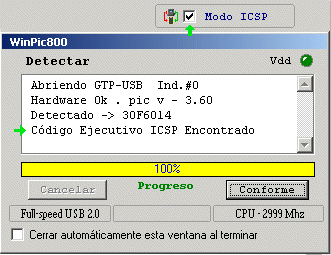
This Code will always remain resident even if we delete the device. Once recorded we can proceed to verify if it is available, checking “ICSP Mode” and pressing “Detect Device“. We will leave “ICSP Mode” enabled while we use it, We will disable it to return to normal mode as it suits us.
 Next we will enter in “Software Configuration” and we will choose in the zone that we want to interact.

We will not be able to use and we will have to leave by default some configuration bits that would prevent their programming. Serie dsPIC30F |


 s
s